
September 4, 2026
Category: AI Employee
Every operations team loses hours every week to work that follows a pattern — pulling reports, chasing approvals, matching numbers across two systems, and updating records that never quite stay in sync. An AI operations employee is built to take on exactly this kind of repetitive, rules-based workload, so your team can spend its time on decisions instead of data entry. In this guide, we’ll look at where operations teams lose the most time, how an AI operations employee actually works inside your existing stack, the metrics that prove it’s paying off, and a practical 30-day plan to pilot one.
Where Operations Teams Lose the Most Time
Before automating anything, it helps to name the specific places where hours quietly disappear. Most operations teams see the same patterns show up again and again:
- 1. Reports: pulling data from multiple systems, formatting it, and distributing it on a recurring schedule.
- 2. Approvals: routing requests to the right person, chasing sign-off, and tracking who approved what and when.
- 3.Reconciliations: comparing records across two or more systems — invoices to purchase orders, payments to bank statements, inventory counts to system records — and flagging mismatches.
- 4.Data updates: keying the same information into a CRM, ERP, spreadsheet, and ticketing tool so every system reflects the same reality.
- 5.Repetitive coordination: sending status updates, scheduling handoffs, and nudging stakeholders when a step in a process stalls.
None of this work is difficult, but all of it is constant. That combination — low complexity, high volume — is precisely the profile that business operations automation is built to solve.
What an AI Operations Employee Actually Is
An AI operations employee is a persistent digital worker assigned to a specific operational role, much like the AI employees now used across support and sales functions. Instead of answering a single prompt and stopping, it holds context across a multi-step process: it reads incoming data, checks it against your policies, takes action inside your business systems, and reports back on what it did. Where a script breaks the moment a field changes format, an AI operations employee reasons through variation the way a trained team member would.
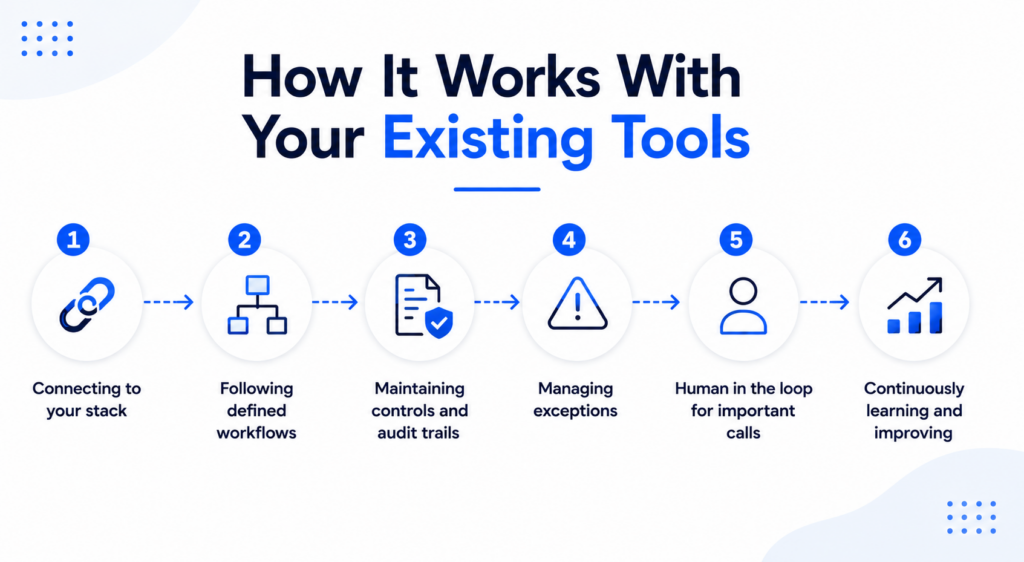
How It Works With Your Existing Tools
A back office AI employee doesn’t replace your systems — it works inside them. In practice, that means:
- 1. Connecting to your stack. Integrations via API connect the AI operations employee to your CRM, ERP, accounting software, spreadsheets, and ticketing tools, so it reads and writes in the same systems your team already uses.
- 2. Following defined workflows. Each process — a reconciliation, an approval chain, a report cycle — is mapped as a workflow with clear steps, decision points, and escalation rules.
- 3. Maintaining controls and audit trails. Every action is logged: what was read, what decision was made, what was changed, and why. This gives operations and compliance teams a clear record to review at any time.
- 4. Managing exceptions. When something falls outside the defined rules — a mismatched amount, missing data, an unusual request — the AI operations employee flags it and routes it to a human rather than guessing.
This structure is what separates genuine AI operations automation from a simple script: it can handle the routine 80% of cases end-to-end, while reliably handing off the remaining 20% to the right person with full context attached.For guidance on managing AI risks and controls, see the NIST AI Risk Management Framework
Measurable Benefits of AI Operations Automation
The value of a back-office AI employee should show up in numbers your team already tracks, not just in a general sense of “efficiency.” Organizations piloting these systems typically look at:
- Hours saved per week on reporting, reconciliation, and data-entry tasks that no longer need manual handling.
- Process quality, measured as a drop in data-entry errors, missed approvals, or mismatched records.
- Cycle time — how long it takes a report, approval, or reconciliation to go from start to finish.
- Exception rate, or the share of cases that need human review versus those handled end-to-end.
- Cost per transaction for high-volume processes like invoice matching or record updates.
Tracking these metrics from day one is what turns “we automated a process” into a defensible business case for expanding business operations automation to the next workflow.
A Practical 30-Day Pilot Plan
Rolling out an AI operations employee doesn’t need to be a quarter-long project. A focused 30-day pilot is usually enough to prove the model on one process:
- Week 1 — Process mapping. Pick one high-volume, rules-based process and document every step, decision point, and system it touches.
- Week 2 — Build and connect. Configure the AI operations employee, connect it to the relevant systems, and define escalation rules for exceptions.
- Week 3 — Shadow mode. Run the AI operations employee alongside your existing process without letting it act independently, comparing its outputs to what your team produces.
- Week 4 — Phased rollout. Give the AI operations employee live responsibility for a defined slice of the workload, monitor the metrics above, and expand once results hold steady.
This mirrors the approach used for broader AI automation rollouts: start narrow, validate against real output, then scale with evidence in hand.
When to Build Something Custom
Off-the-shelf automations cover a lot of ground, but some workflows involve legacy systems, unusual approval chains, or industry-specific compliance requirements that need a tailored approach. In those cases, ,custom software development can extend an AI operations employee to fit your exact process rather than forcing your process to fit a generic template. For a sense of what this looks like end-to-end, this business automation workflow example walks through a real reconciliation process from mapping to live rollout.


.webp)